4 Simple Steps to Set Up PHP Composer on cPanel Shared Hosting
PHP Composer in shared hosting helps in dependency management of modern PHP applications much easier and efficiently. Composer lets you install and manage packages on the server without uploading a large vendor folder every time you update your project - with simple terminal commands.
With ...

SSL Certificates (Let’s Encrypt vs Paid) on Shared Hosting: A Complete Tutorial
Introduction
If you've been putting off getting an SSL certificate for your website, you're not alone. We get it: the whole topic can seem overwhelming, especially when you're trying to run a business and suddenly everyone's talking about HTTPS, padlocks, and browser warnings. But here's ...
How to Use cPanel to Manage Your Hosting Account
Introduction
Managing your web hosting account doesn't have to be intimidating. If you've ever felt overwhelmed by the technical aspects of website management, cPanel is your friendly gateway to taking control of your hosting environment. This powerful control panel transforms complex server management tasks into ...
Mastering Email Forwarding: How to Create Rules in Any Control Panel (Step-by-Step)
Email forwarding has become an essential tool for modern businesses and individuals who juggle multiple email addresses, work across different departments, or simply want to streamline their communication workflow. Whether you're running a small business from Nepal or managing a global enterprise, understanding how ...
The Beginner’s Guide to WHM: Essential Knowledge for Web Hosts and Resellers
Whether you're starting your own hosting business or managing multiple client accounts, WHM (Web Host Manager) is the control panel that sits at the heart of it all. But for beginners, WHM can look like a cockpit full of switches. No worries, we’re about ...
Custom Cron Jobs in WordPress: Automating Tasks for Enhanced Site Management (An In-Depth Research)
Managing a WordPress website involves numerous repetitive tasks that consume valuable time and mental energy. Publishing scheduled posts, cleaning up expired data, sending automated emails, backing up databases, optimizing images, and monitoring performance metrics are just a few examples of the routine maintenance that ...
Using Git with cPanel: How to Version Control Your Website (2025 Pro Guide)
Gone are the days of dragging and dropping files over FTP and manually updating production websites. Today, smart developers and digital businesses rely on control systems like Git Version to manage their codebases, collaborate effectively, and streamline deployments.
And here’s the good news: cPanel comes ...
How to Deploy a Laravel App on cPanel or VPS Hosting (2025 Guide – Laravel 11 Ready)
Modern PHP development has come a long way, and today’s frameworks offer tools that make development seamless, maintainable, and scalable, like Laravel. But when it comes to going live, deploying your web application isn’t quite as simple as uploading files to a folder, especially ...

How to Choose the Perfect Hosting Stack in 2025 (And Never Regret It)
Choosing your hosting stack is like picking the engine for your dream car; get it wrong, and you’ll stall halfway. In 2025, with AI workloads rising, web apps getting fatter, and users expecting instant loading, your hosting stack decision is no longer just a ...
How to Schedule Regular Website Backups Using cPanel Cron Jobs
Keeping regular backups of your website is crucial for security, peace of mind, and disaster recovery. But manually backing up your files and databases can be tedious and easy to forget. Luckily, if your web host uses cPanel, you can automate this process with ...

Enhancing Database Management Security: A Comprehensive Guide to Installing and Securely Using phpMyAdmin in cPanel
phpMyAdmin stands as a remarkably useful web-based administration tool, designed to streamline the management of MySQL and MariaDB databases. Its intuitive graphical interface offers a significant advantage, particularly for users who prefer visual interaction over the intricacies of command-line interfaces. However, the very web ...

How to Set Up a Staging Environment in cPanel Without Plugins
Making direct changes to your live website? That’s a risky move. Whether it’s a theme update, plugin test, or a custom code tweak, even a small mistake can crash your entire site. That’s why every serious website owner needs a staging environment—and not just ...

cPanel Alternatives: Should Users Consider DirectAdmin or Plesk?
In the world of web hosting and server management, cPanel has long been a dominant player. But, as technology evolves and user needs shift, the question arises: Are there viable alternatives? More specifically, should users consider the mentioned alternatives?
In this post, we’ll explore why ...
How to Remotely Access a MySQL Database via cPanel
A Complete Step-by-Step Guide to Enabling Remote MySQL Access for Developers & Site Owners
Need to manage your website’s database while away from cPanel? Remote MySQL access to your database gives you the flexibility to work from any location using tools like MySQL Workbench or ...

How to Force HTTPS Using .htaccess in cPanel (Step-by-Step Guide)
Why HTTPS Matters
The little padlock in the browser means more than just security—it signals trust, privacy, and professionalism. Using a secure connection ensures your visitors’ data is encrypted and shows search engines that your site is trustworthy. If your site still uses HTTP, you ...
Step-by-Step Guide to Switching PHP Versions via MultiPHP Manager in cPanel
Introduction
Keeping your website’s PHP version up-to-date is crucial for better performance, improved security, and broader compatibility with modern applications and frameworks.
Thanks to cPanel’s MultiPHP Manager, you can easily manage and switch PHP versions for your domain or subdomains without touching a single line of ...

Master Changing PHP Version Using .htaccess in cPanel (No Server Access Needed)
Keeping your website running smoothly means staying updated — and that includes your PHP version. If you’re looking for a simple and flexible way to change the PHP version for a specific site or directory without affecting the entire server, you can easily do ...

Step-by-Step Guide to Changing PHP Version via PHP Selector in cPanel
Upgrading your PHP version isn't just a technical update — it's a key move for your website’s performance, security, and compatibility.
Whether you’re chasing faster load times, better plugin support, or tighter security, updating your PHP version through cPanel’s PHP Selector is one of the ...

How to Add an Addon Domain in cPanel (2025 Edition)
Managing multiple websites under one hosting plan? An addon domain in cPanel makes it super simple. This guide will walk you through adding a new domain to your hosting account — fast, clean, and without confusion.
What Is an Addon Domain?
An addon domain lets you ...
Creating a Node App in cPanel: 7 easy steps you SHOULD follow
In this blog, we will be creating a node app in cPanel provided by Nest Nepal. The steps are straightforward, and you will not need to do any coding or scripting. Even a person from non-computer science background can conduct this installation.
Steps for creating ...

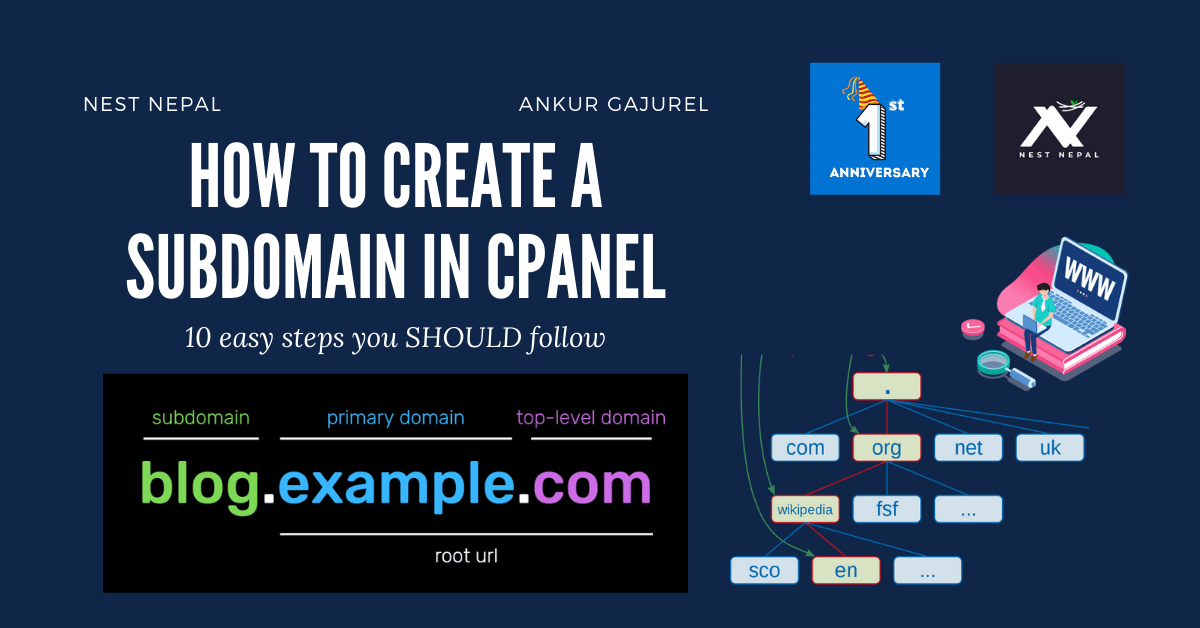
How to create a subdomain in cPanel: 10 easy steps you MUST follow
In this blog, we are going to see how we can create a subdomain in cPanel using hosting and cPanel provided by Nest Nepal. The steps are very simple and you will not need to do any coding or scripting. Even a person from ...